What Is a Mobile Hotspot? How 4G, 5G, Wi-Fi & Tethering Work
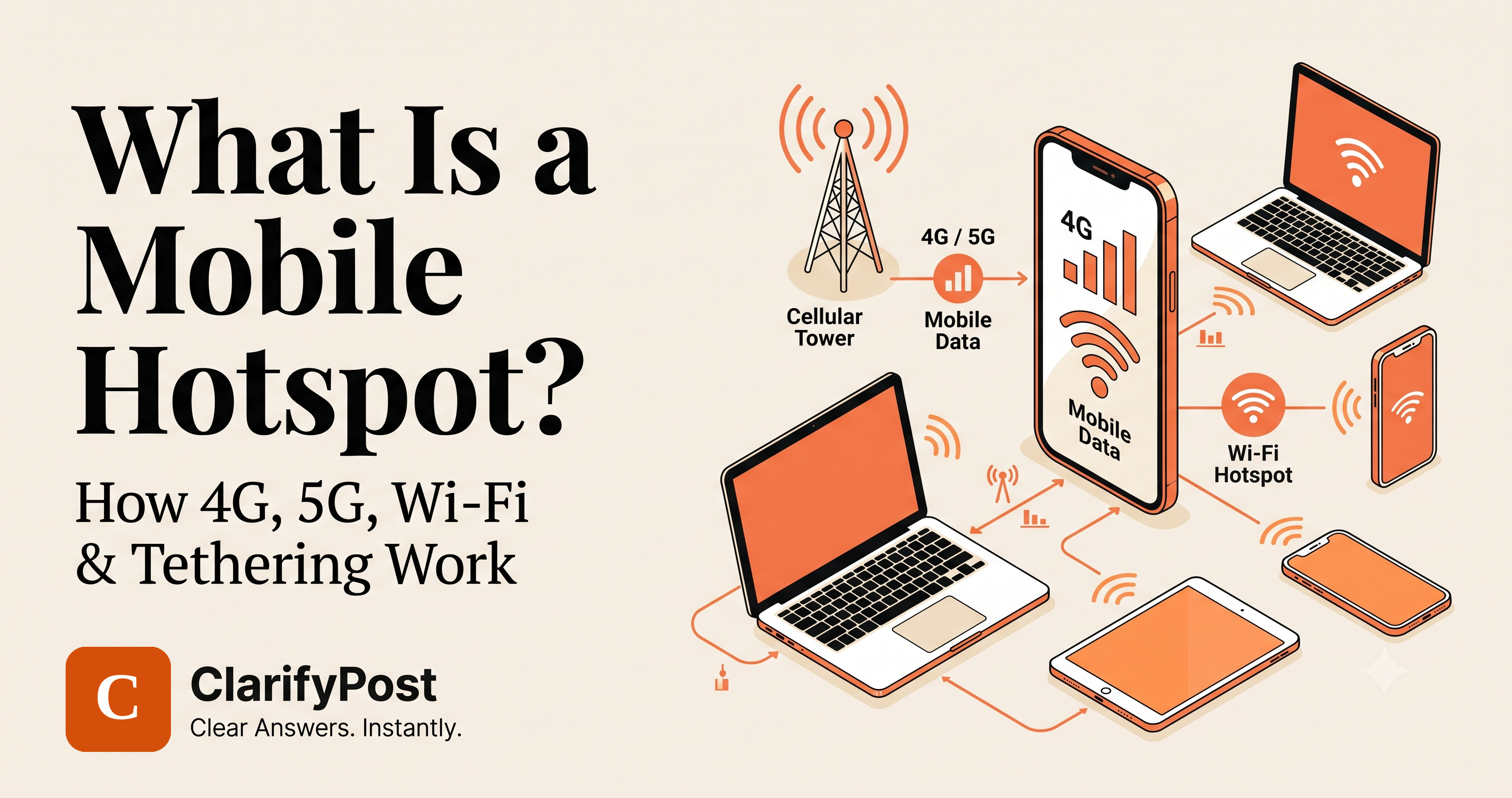
A mobile hotspot is a feature that lets your smartphone or dedicated hotspot device share its cellular internet connection with other devices over Wi-Fi. Instead of connecting your laptop or tablet directly to a mobile network, the phone acts like a small Wi-Fi router: it receives internet through 4G or 5G and creates a local Wi-Fi network that other devices can join.
Key Takeaways
Before we get into the details, here is what you need to know:
- A mobile hotspot turns a phone's cellular data connection into a Wi-Fi network.
- 4G and 5G provide the internet connection; Wi-Fi distributes that connection to nearby devices.
- Personal Hotspot is Apple's name for this feature, while Android commonly calls it Wi-Fi Hotspot or Hotspot & tethering.
- Tethering is the broader term for sharing one device's internet connection with another device.
- You can tether through Wi-Fi, USB, or Bluetooth, depending on your phone and operating system.
- A hotspot can connect laptops, tablets, smart TVs, game consoles, and other Wi-Fi-enabled devices.
- Hotspot usage consumes your mobile data and can drain your phone's battery quickly.
- Your actual hotspot speed depends on cellular coverage, network congestion, your plan, device capability, and the connection between devices.
- A mobile hotspot is convenient for travel, remote work, emergencies, and places without reliable Wi-Fi.
- A hotspot is not automatically "unlimited" just because your mobile plan has unlimited phone data. Carriers may apply separate hotspot limits or restrictions.
What Is a Mobile Hotspot?
Have you ever needed internet on a laptop when there was no Wi-Fi nearby?
Your smartphone may already have the solution.
A mobile hotspot allows a smartphone to share its cellular internet connection with other devices. When you enable the feature, your phone essentially creates a small wireless access point.
For example:
5G/4G cellular network → Smartphone → Wi-Fi → Laptop
Your phone receives internet access from the cellular network and then broadcasts that connection over Wi-Fi.
That means your laptop does not need its own cellular modem or SIM card. It simply connects to your phone's hotspot like it would connect to any other Wi-Fi network.
Google describes Android hotspot/tethering as a way to use mobile data to connect another phone, tablet, or computer to the internet. Android devices can commonly share the connection through Wi-Fi, Bluetooth, or USB.
On Apple devices, the equivalent feature is called Personal Hotspot. Apple describes it as using an iPhone or cellular iPad's mobile data connection to create a temporary Wi-Fi network for other devices.
How Does a Mobile Hotspot Work?
A mobile hotspot combines two different wireless technologies:
- Cellular networking — 4G or 5G brings internet to your phone.
- Wi-Fi — your phone shares that internet connection with nearby devices.
The basic process looks like this:
                 INTERNET
                    │
                    ▼
             4G / 5G NETWORK
                    │
                    ▼
              ┌───────────┐
              │  SMARTPHONE│
              │            │
              │ Hotspot ON │
              └─────┬─────┘
                    │
                 Wi-Fi
          ┌─────────┼─────────┐
          ▼         ▼         ▼
       Laptop     Tablet    Smart TV
Your phone therefore performs two jobs at once:
- It communicates with the cellular network.
- It acts as a Wi-Fi access point for other devices.
This is why a phone can function somewhat like a small Wi-Fi router.
However, a smartphone hotspot is not exactly the same as a traditional home router.
A home router normally receives internet through fiber, cable, DSL, or another fixed connection. A mobile hotspot receives its internet through a cellular network.
Mobile Hotspot vs Wi-Fi: What's the Difference?
The terms can be confusing because a mobile hotspot uses Wi-Fi.
The easiest way to understand it is:
Wi-Fi is the wireless connection method. A mobile hotspot is a device or feature that creates a Wi-Fi network using another internet connection.
For example:
| Technology | What it does |
|---|---|
| 4G | Connects your phone to the cellular network |
| 5G | Provides newer, potentially faster cellular connectivity |
| Wi-Fi | Connects nearby devices wirelessly |
| Mobile Hotspot | Shares cellular internet through Wi-Fi |
| Personal Hotspot | Apple's name for its hotspot feature |
| Tethering | General term for sharing an internet connection |
| Wi-Fi Router | Usually distributes internet from a fixed or dedicated connection |
So when someone says "WiFi hotspot", they are usually talking about a Wi-Fi network created by a hotspot device.
What Is Tethering?
Tethering means sharing one device's internet connection with another device.
A mobile hotspot is therefore one form of tethering.
There are three common forms:
1. Wi-Fi Tethering
This is the most common method.
Your phone creates a Wi-Fi network. You select that network on your laptop or tablet and enter the hotspot password.
Phone → Wi-Fi → Laptop
This is usually the easiest option because it does not require a cable.
2. USB Tethering
Your phone connects directly to another device using a USB cable.
Phone → USB cable → Computer
USB tethering can be useful when you want a direct connection or want to avoid creating a Wi-Fi network.
It can also help keep the phone charged if the computer provides power through USB.
3. Bluetooth Tethering
The phone and another device communicate through Bluetooth.
Phone → Bluetooth → Computer
Bluetooth tethering is generally more specialized and may be slower than Wi-Fi, but it can be useful when Wi-Fi tethering is inconvenient.
Android officially supports Wi-Fi, Bluetooth, and USB tethering on many devices.
Apple also supports Personal Hotspot through Wi-Fi, USB, and Bluetooth.
What Is a Personal Hotspot?
If you use an iPhone, you will commonly see the term Personal Hotspot instead of "mobile hotspot."
Functionally, they describe the same basic idea: your iPhone shares its cellular internet connection with other devices.
On supported iPhones:
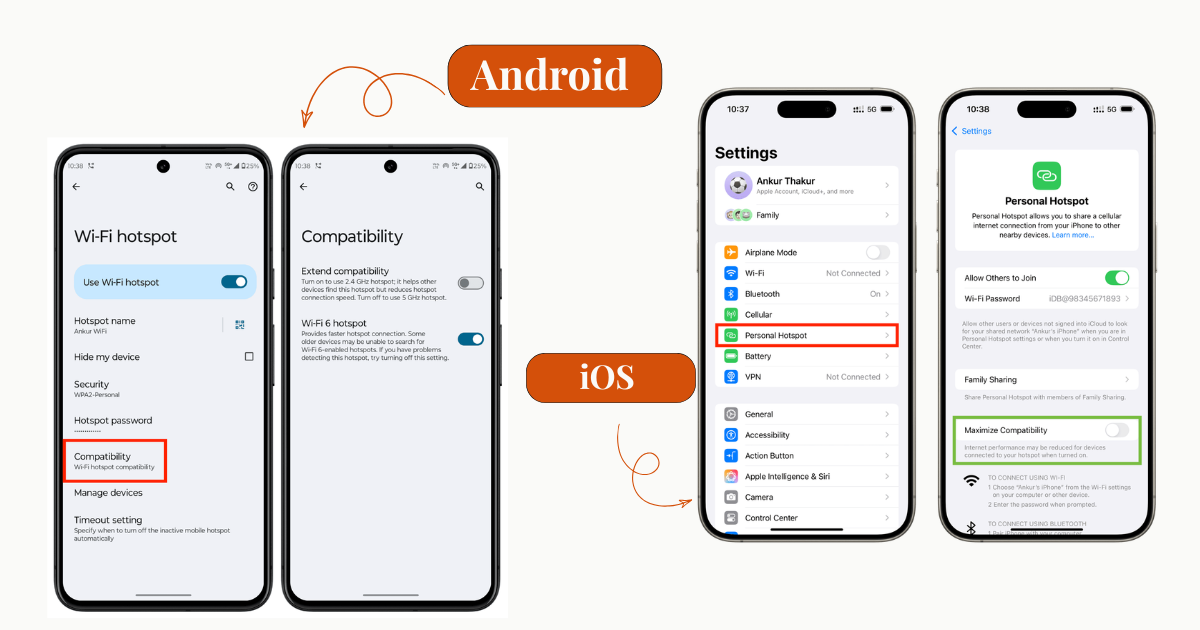
Settings → Personal Hotspot → Allow Others to Join
You can then connect another device through Wi-Fi.
Apple notes that Personal Hotspot requires a carrier that supports the feature, and the number of devices that can connect can depend on the carrier and iPhone model.
On Android, the wording varies by manufacturer and Android version, but you will commonly find the feature under:
Settings → Network & Internet / Connections → Hotspot & Tethering
The exact menu can differ between Samsung, Google Pixel, Xiaomi, OnePlus, and other phones.
How to Use a Mobile Hotspot
The exact steps depend on your phone.
On Android
A typical Android setup looks like this:
- Open Settings.
- Open Network & Internet, Connections, or a similar menu.
- Tap Hotspot & tethering or Mobile Hotspot.
- Turn on Wi-Fi Hotspot.
- Check the hotspot name and password.
- On your laptop or other device, open the Wi-Fi menu.
- Select your phone's hotspot name.
- Enter the password and connect.
Google's current Android guidance follows this general process and notes that some carriers may limit or charge extra for tethering.
On iPhone
A typical iPhone process is:
- Open Settings.
- Tap Personal Hotspot or Cellular → Personal Hotspot.
- Turn on Allow Others to Join.
- Check the displayed Wi-Fi password.
- On your laptop or tablet, open the Wi-Fi menu.
- Select your iPhone's hotspot.
- Enter the password.
Apple's current support documentation confirms that Personal Hotspot can be used with iPhones, iPads, Macs, Windows PCs, and other Wi-Fi-enabled devices.
Does a Mobile Hotspot Use Mobile Data?
Yes.
A mobile hotspot normally uses the cellular data connection included with your mobile plan.
Suppose you connect your laptop to your phone and watch a high-resolution video.
The data is not magically coming from Wi-Fi.
The path is:
Cellular data → Phone → Wi-Fi → Laptop → Video
The video still consumes your mobile data allowance.
This is important because laptops can use considerably more data than smartphones.
For example, a computer might:
- Download operating-system updates.
- Synchronize cloud storage.
- Load high-resolution websites.
- Stream high-resolution video.
- Download large software packages.
- Sync photos and files in the background.
Therefore, a laptop connected to a mobile hotspot can consume data surprisingly quickly.
Does 5G Make a Mobile Hotspot Faster?
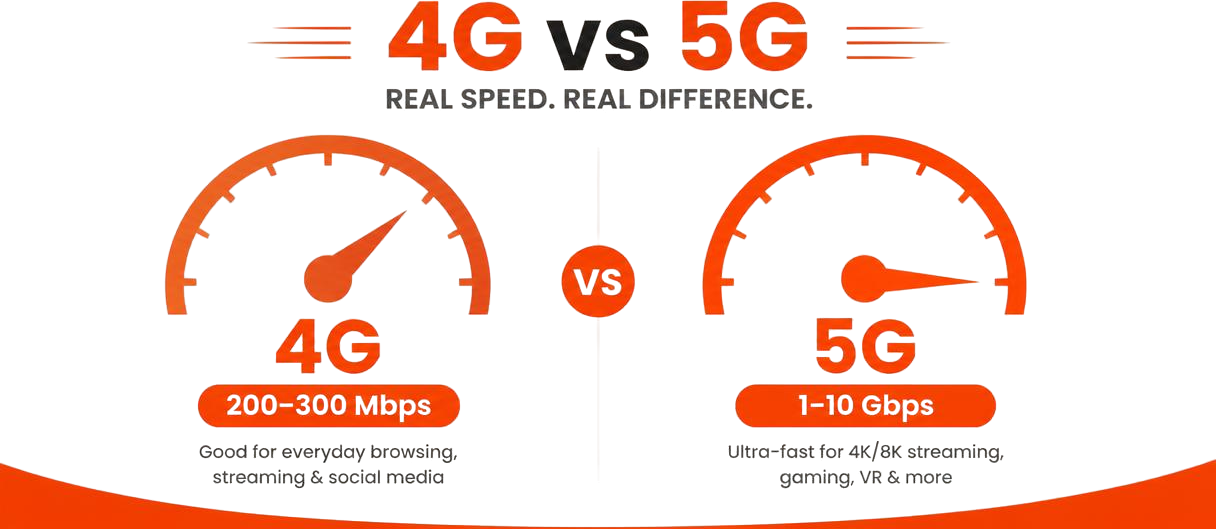
It can, but 5G does not automatically guarantee faster hotspot performance.
A hotspot's real-world speed depends on several factors:
- Cellular signal strength
- 4G or 5G network availability
- Network congestion
- Your carrier's network
- Your mobile plan
- Phone modem capability
- Hotspot Wi-Fi capability
- Number of connected devices
- Distance between devices
- Environmental interference
A strong 5G connection can provide excellent hotspot performance, but a congested 5G network can still perform poorly.
Likewise, a strong 4G LTE connection can be perfectly adequate for browsing, email, video calls, and many everyday tasks.
4G Hotspot vs 5G Hotspot
| Feature | 4G Hotspot | 5G Hotspot |
|---|---|---|
| Cellular technology | 4G/LTE | 5G |
| Potential speed | Good | Potentially much higher |
| Availability | Very widespread | Depends on coverage |
| Latency | Generally higher | Can be lower |
| Battery impact | Depends on device/network | Can be higher in some situations |
| Best for | Everyday internet use | High-speed downloads and demanding workloads |
The important point is that the hotspot itself does not create 5G.
If your phone is connected to a 4G network, your hotspot is sharing that 4G connection.
If your phone is connected to 5G, the hotspot can share that 5G connection.
Mobile Hotspot vs Wi-Fi Router
A mobile hotspot and a Wi-Fi router can look similar from the perspective of a connected laptop, but they work differently.
Mobile Hotspot
Cellular Network
      ↓
Smartphone
      ↓
Wi-Fi
      ↓
Your devices
Traditional Wi-Fi Router
Fiber / Cable / ISP
        ↓
     Router
        ↓
      Wi-Fi
        ↓
 Your devices
A traditional Wi-Fi router usually stays in one location and connects to a fixed broadband service.
A mobile hotspot is designed to work wherever the phone or hotspot device has cellular coverage.
Which is better?
For a permanent home connection, a conventional Wi-Fi router with reliable broadband is usually more suitable.
For temporary connectivity, travel, emergencies, or working away from home, a mobile hotspot can be much more convenient.
When Should You Use a Mobile Hotspot?
A mobile hotspot is particularly useful when you need internet away from your normal Wi-Fi connection.
1. Working While Traveling
You can connect your laptop to your phone while traveling by bus, train, or car.
2. Emergency Internet
If your home broadband stops working, your phone can provide temporary connectivity.
3. Remote Work
You can use a hotspot for email, messaging, meetings, cloud applications, and other work tasks when reliable Wi-Fi isn't available.
4. College or School
A student can connect a laptop or tablet using a phone's mobile data connection.
5. Outdoor Events
A hotspot can provide internet where public Wi-Fi isn't available.
6. Temporary Internet for a New Device
If you are setting up a new computer and don't yet have access to Wi-Fi, your phone can provide temporary connectivity.
What Are the Advantages of a Mobile Hotspot?
Portability
Your internet connection travels with you.
No Separate Wi-Fi Network Required
You can create your own temporary network without relying on public Wi-Fi.
Easy Setup
Most modern phones can create a hotspot in seconds.
Multiple Devices
Depending on your phone and carrier, multiple devices can connect simultaneously.
Better Control Than Public Wi-Fi
You control the hotspot password and can turn the hotspot off when you are finished.
Useful in Emergencies
A hotspot can provide a backup connection when another internet service is unavailable.
What Are the Disadvantages?
Mobile hotspots are convenient, but they are not a perfect replacement for broadband.
Battery Drain
Running cellular networking and Wi-Fi simultaneously can consume significant battery power.
Data Consumption
Connected devices can use large amounts of mobile data, especially laptops.
Variable Speed
Performance depends heavily on cellular coverage and network congestion.
Heat
Heavy hotspot usage can make a smartphone warm.
Carrier Restrictions
Some mobile plans limit hotspot usage, reduce speeds after a threshold, or require a specific hotspot allowance.
Google and Apple both warn that carrier support, limits, or additional charges can apply depending on the plan.
Limited Range
A phone hotspot is designed for nearby devices, not for covering an entire house like a properly positioned Wi-Fi router.
Is a Mobile Hotspot Safe?
A personal hotspot can be reasonably secure when configured correctly, but you should still treat it as a network that requires protection.
Use a Strong Password
Do not use an obvious password such as:
12345678
password
qwerty123
Use a unique password that is difficult to guess.
Turn the Hotspot Off When Finished
If you don't need it, disable it.
This reduces unnecessary battery and data usage and prevents unwanted connections.
Avoid Sharing the Password Publicly
Anyone who knows the password may be able to attempt to connect while your hotspot is active.
Check Connected Devices
If your phone shows connected devices, review them when something looks unusual.
Apple's security documentation states that Personal Hotspot supports WPA2/WPA3 Personal security by default on supported Apple platforms.
Can Someone See My Data Through a Mobile Hotspot?
Your connected devices use your phone's internet connection, but that does not mean another hotspot user automatically gets access to everything on your phone.
The hotspot is primarily providing network connectivity.
However, security still matters.
You should:
- Use a strong hotspot password.
- Keep your phone updated.
- Avoid connecting unknown devices.
- Turn the hotspot off when unnecessary.
- Use HTTPS websites and trusted applications.
- Avoid sharing sensitive information with untrusted devices.
Remember that network security and account security are separate issues. A secure hotspot does not protect you from phishing, malicious websites, stolen passwords, or compromised applications.
Why Is My Mobile Hotspot Slow?
If your hotspot is slower than expected, work through these checks.
1. Check Your Cellular Signal
Move to an area with stronger 4G or 5G coverage.
2. Check the Network
Your phone may show 5G but still experience congestion.
3. Disconnect Unnecessary Devices
Multiple connected devices share the available connection.
4. Check Background Downloads
Your laptop may be downloading updates or syncing cloud files.
5. Move the Devices Closer
Wi-Fi performance can decrease with distance and interference.
6. Restart the Hotspot
Turn the hotspot off, wait a moment, and turn it back on.
7. Check Your Mobile Plan
Your carrier may impose hotspot-specific limits or speed restrictions.
8. Try USB Tethering
If Wi-Fi is unreliable, USB tethering may provide a more direct connection.
Why Does My Hotspot Keep Disconnecting?
Frequent disconnections can have several causes:
- Weak cellular signal
- Phone battery-saving settings
- Device overheating
- Network congestion
- Carrier restrictions
- Inactive hotspot timeout settings
- Wi-Fi interference
- Software problems
- Too many connected devices
On many phones, hotspot settings can automatically disable the hotspot after a period without connected devices.
If the problem continues, restart both devices and check for software updates.
Can a Mobile Hotspot Replace Home Wi-Fi?
Sometimes, but not always.
For a single person with moderate internet usage, a strong 5G hotspot can potentially serve as a temporary or even primary connection.
But there are trade-offs.
A home broadband connection is generally better suited for:
- Multiple people
- Multiple always-connected devices
- Large downloads
- Heavy streaming
- Smart-home devices
- Gaming
- Long-term usage
A mobile hotspot is more attractive when:
- You travel frequently.
- You need backup internet.
- Broadband isn't available.
- You work from different locations.
- Your mobile plan provides generous hotspot data.
What Is a Portable Mobile Hotspot Device?
You don't necessarily need a smartphone to create a mobile hotspot.
A portable hotspot device, sometimes called a MiFi or mobile Wi-Fi router, contains its own cellular modem and usually has a SIM or eSIM.
Its basic architecture is:
        4G / 5G
           ↓
   Portable Hotspot
           ↓
         Wi-Fi
     ┌─────┼─────┐
     ↓     ↓     ↓
 Laptop Tablet Phone
Unlike a phone, the device is designed primarily to provide internet connectivity.
This can be useful when you need a dedicated connection for several devices without draining your smartphone battery.
Mobile Hotspot, Tethering, and Wi-Fi Hotspot: Explained
These terms are often used interchangeably, but there are subtle differences.
Mobile Hotspot
Usually refers to a feature or device that shares a cellular internet connection over Wi-Fi.
Wi-Fi Hotspot
A Wi-Fi network created by a device so other devices can connect.
Personal Hotspot
Apple's terminology for its internet-sharing feature.
Tethering
The broader concept of sharing one device's internet connection with another device using Wi-Fi, USB, or Bluetooth.
Mobile Wi-Fi
A general term that can describe portable internet connectivity, often through a dedicated cellular hotspot device.
How Many Devices Can Connect to a Mobile Hotspot?
There is no universal number.
The maximum depends on:
- Smartphone model
- Operating system
- Carrier
- Hotspot implementation
- Network conditions
- Connected-device bandwidth requirements
Some Android devices can support multiple connected devices; Google documentation, for example, notes support for up to 10 devices via Wi-Fi hotspot on many Android phones, while actual availability can vary.
Apple similarly notes that the number of devices allowed can depend on the carrier and iPhone model.
More connected devices also mean the available bandwidth is being shared.
Does Hotspot Work Without Wi-Fi?
Yes.
This is one of the most important things to understand.
Your phone does not need to be connected to another Wi-Fi network to create a mobile hotspot.
The normal setup is:
Cellular network → Phone → Wi-Fi hotspot
The phone's cellular connection provides the internet.
However, the exact capabilities of a particular phone can vary. Some devices can also share an existing Wi-Fi connection through certain tethering modes, but that is different from the normal cellular hotspot use case.
Does Hotspot Work Without Mobile Data?
For the normal mobile-hotspot use case, no.
If your phone has no usable cellular internet connection, there is normally nothing to share with another device.
You generally need:
- An active cellular service
- Mobile data enabled
- Network coverage
- A carrier plan that permits hotspot/tethering
Apple explicitly notes that Personal Hotspot requires cellular service and carrier support.
How Much Data Does a Mobile Hotspot Use?
There is no fixed amount.
It depends entirely on what the connected device does.
For example:
| Activity | Potential data impact |
|---|---|
| Low | |
| Text-based browsing | Low |
| Social media | Low to moderate |
| Video calls | Moderate |
| Music streaming | Moderate |
| HD video streaming | High |
| 4K video streaming | Very high |
| Game downloads | Very high |
| Operating-system updates | Very high |
| Cloud backup | Potentially very high |
A useful rule is:
The hotspot itself does not consume a fixed amount of data; the activities performed through it consume the data.
How to Make Your Mobile Hotspot Last Longer
If you are using your phone as a hotspot for an extended period:
Reduce Screen Usage
Your screen does not need to stay on once the connection is established, unless your device requires it during setup.
Keep the Phone Cool
Avoid leaving it under direct sunlight or in a hot environment.
Use USB Tethering When Appropriate
USB can provide a direct connection and may allow the computer to supply power.
Limit Background Data
Disable unnecessary cloud synchronization and automatic downloads on the connected computer.
Disconnect Unused Devices
Every connected device can consume bandwidth and potentially data.
Use a Charger or Power Bank
Hotspot usage can drain the battery quickly.
Mobile Hotspot Example
Imagine you are working from a café where the public Wi-Fi is unreliable.
You have:
- A smartphone with 5G
- A laptop
- A mobile data plan with hotspot support
You enable your Personal Hotspot / Wi-Fi Hotspot.
Your laptop sees:
Dippan's Phone
You enter the password.
Now the connection is:
Laptop
   ↓
Wi-Fi
   ↓
Smartphone
   ↓
5G
   ↓
Internet
To the laptop, it looks like a normal Wi-Fi connection.
But behind the scenes, the internet is arriving through the cellular network.
That is the core idea behind a mobile hotspot.
Mobile Hotspot vs Public Wi-Fi
| Feature | Mobile Hotspot | Public Wi-Fi |
|---|---|---|
| Internet source | Cellular data | Local broadband/network |
| Portability | Excellent | Location dependent |
| Password control | Usually yours | Controlled by provider |
| Data limit | Depends on mobile plan | Depends on provider |
| Speed | Depends on cellular network | Depends on Wi-Fi network |
| Security | You control hotspot access | Varies |
| Best for | Personal/temporary connectivity | Fixed public locations |
A personal hotspot is especially useful when you don't trust an unknown public Wi-Fi network or when no Wi-Fi network is available.
The Simple Way to Remember It
If all of this terminology feels confusing, remember this:
4G or 5G brings the internet to your phone. Wi-Fi shares that internet with nearby devices. Tethering is the general process of sharing the connection. A mobile hotspot is the feature or device that makes this possible.
So:
4G / 5G
   ↓
Internet on your phone
   ↓
Mobile Hotspot
   ↓
Wi-Fi
   ↓
Laptop / Tablet / TV / Other Devices
Frequently Asked Questions
What is a mobile hotspot in simple words?
A mobile hotspot lets your phone share its mobile internet with other devices through Wi-Fi. Your phone receives internet through 4G or 5G and creates a Wi-Fi network that your laptop, tablet, or other devices can join.
Is a mobile hotspot the same as Wi-Fi?
Not exactly. Wi-Fi is the wireless networking technology used to connect devices. A mobile hotspot is a feature or device that can create a Wi-Fi network using a cellular internet connection.
Is a mobile hotspot free?
The hotspot feature may be built into your phone, but the internet connection normally uses your mobile data plan. Your carrier may limit hotspot data or charge additional fees.
Is 5G hotspot better than 4G hotspot?
5G can provide higher speeds and lower latency in suitable conditions, but real-world performance depends on coverage, congestion, your phone, and your mobile plan. A strong 4G connection can still be excellent for everyday use.
Does hotspot use more battery?
Yes. Your phone is maintaining a cellular connection while simultaneously operating as a Wi-Fi access point. Heavy hotspot use can therefore increase battery consumption.
Can I connect my laptop to my phone hotspot?
Yes. If your phone and mobile plan support hotspot/tethering, you can generally connect a laptop through Wi-Fi. USB or Bluetooth tethering may also be available depending on the devices.
Can I use hotspot without Wi-Fi?
Yes. A mobile hotspot normally uses your phone's cellular connection to provide internet and then creates a Wi-Fi network for other devices.
Does hotspot work without mobile data?
Normally, no. A conventional mobile hotspot needs a usable cellular internet connection to share.
Is a mobile hotspot a router?
A smartphone hotspot performs some functions of a Wi-Fi router by creating a local wireless network and forwarding internet traffic. However, it is not equivalent to a full home router in terms of hardware, range, capacity, and typical internet source.
How far does a mobile hotspot reach?
The practical range depends on the phone, Wi-Fi band, obstacles, interference, and connected device. It is generally intended for nearby devices rather than whole-home coverage.
What is the difference between hotspot and tethering?
Tethering is the general concept of sharing an internet connection. A Wi-Fi mobile hotspot is one common form of tethering. USB and Bluetooth tethering are other forms.
Can a mobile hotspot replace home internet?
It can in some situations, particularly for one person with strong cellular coverage and a suitable hotspot plan. For households with many devices and heavy usage, traditional broadband is usually more practical.
Final Answer: What Is a Mobile Hotspot?
A mobile hotspot is a portable internet-sharing feature that turns a smartphone or dedicated cellular device into a Wi-Fi access point.
Your phone receives internet through 4G or 5G, then shares that connection with laptops, tablets, TVs, and other devices through Wi-Fi.
The simplest model is:
4G/5G → Mobile Phone → Wi-Fi Hotspot → Your Devices
For occasional connectivity, travel, remote work, emergencies, or backup internet, a mobile hotspot can be extremely useful.
But remember the trade-offs: battery consumption, mobile-data usage, variable cellular speeds, and carrier hotspot limits.
If you understand those four things, you understand the basics of mobile hotspots.
Related ClarifyPost Guides
- What Is Agentic AI? How AI Agents Work, Examples, Benefits & Risks
- How Do AI Agents Work? Tools, Memory, Planning, Actions & Real Examples
- What Is a Passkey and Why Are They Replacing Passwords?
- How to Spot AI-Generated Images
Sources & Further Reading
- Google Android Help — Share a mobile connection by hotspot or tethering
- Google Pixel Help — Share a mobile connection by tethering or hotspot
- Apple Support — Connect to the Personal Hotspot of an iPhone or iPad
- Apple Support — Share your internet connection from your iPhone
- Apple Platform Security — Wi-Fi and Personal Hotspot security
Editorial note: Hotspot names, menus, supported connection methods, device limits, and carrier policies can vary by phone model, operating-system version, and mobile provider. Always check your carrier's current hotspot terms before relying on a mobile hotspot for heavy or long-term internet use.